
Multifuncional HP Deskjet 2050 - scanner não funciona no Sabayon Linux [Resolvido]
Dica publicada em Linux / Hardware

Multifuncional HP Deskjet 2050 - scanner não funciona no Sabayon Linux [Resolvido]
Esta dica é uma continuação dessa: Multifuncional HP 2050 (Antiga), não Imprime no Sabayon Linux [Resolvido]
Após instalar a impressora (dica anterior), quando fui usar o scanner, notei que ele não era reconhecido, apesar de ser enxergado pelo sistema. A interface gráfica do Xsane não achava, e vejam a saída destes comandos:
sudo sane-find-scanner
Senha:
# sane-find-scanner will now attempt to detect your scanner. If the
# result is different from what you expected, first make sure your
# scanner is powered up and properly connected to your computer.
# No SCSI scanners found. If you expected something different, make sure that
# you have loaded a kernel SCSI driver for your SCSI adapter.
##### ESTA LINHA INDICA QUE O SCANNER ESTÁ ENCONTRADO! found USB scanner (vendor=0x03f0 [HP], product=0x8711 [Deskjet 2050 J510 series]) at libusb:002:008
# Your USB scanner was (probably) detected. It may or may not be supported by
# SANE. Try scanimage -L and read the backend's manpage.
# Not checking for parallel port scanners.
# Most Scanners connected to the parallel port or other proprietary ports
# can't be detected by this program.
scanimage -L
No scanners were identified. If you were expecting something different,
check that the scanner is plugged in, turned on and detected by the
sane-find-scanner tool (if appropriate). Please read the documentation
which came with this software (README, FAQ, manpages).
O problema parece ter a ver com a versão de Python na qual o HPLIP foi compilado.
Pesquisando uma solução, encontrei o procedimento do usuário italiano de Sabayon, o Sabayonino: HP Multifunction ENVY 4500 Scanning Troubles
Modifiquei um pouco os procedimentos dele e fiz assim:
1. Setar a versão mais nova de Python:
eselect python list
# eselect python set 1 (setar para Python 3.7)
2. Atualizar, se necessário, o Sabayon e o Portage:
# equo up
# equo u -av
# emerge --sync
Ajustar seu Sabayon, para usar Portage. Depois, adicionar estas linhas:
ao arquivo: /etc/portage/make.conf, ou ao arquivo: /opt/sabayon-build/conf/intel/portage/make.conf.amd64, e salvar. Pode usar seu editor favorito, eu gosto de Geany.
Ajuste as variáveis de ambiente:
# env-update
source /etc/profile
Aqui fiz a principal modificação, instalei o HPLIP e dependências diretas, compilado com Portage, mas sem as dependências adicionais, para não alterar meu pacote Avahi (que o Portage tentava recompilar para Python 3.7). Depois sincronizei o Portage com o Entropy:
# emerge -av --nodeps hplip hplip-plugin foomatic-db foomatic-db-engine foomatic-db-ppds gutenprint
# equo rescue symsync
A partir daí, readicionei a minha Multifuncional HP 2050, na tela do HPLIP. Eis que agora, o scanner funciona normal. Veja digitalizando um documento: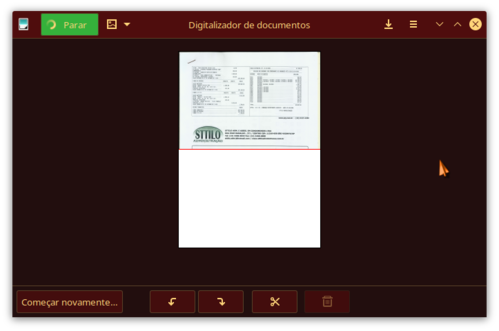 Outros aplicativos de digitalização, como o Xsane e o gscan2pdf, também funcionam:
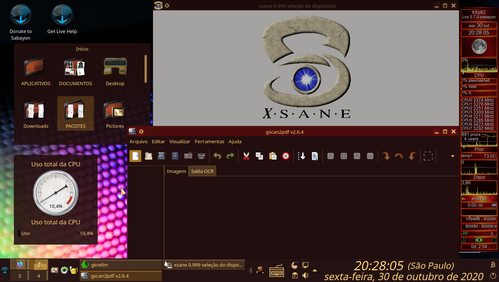 Agora, tudo funciona, impressora e scanner!
Após instalar a impressora (dica anterior), quando fui usar o scanner, notei que ele não era reconhecido, apesar de ser enxergado pelo sistema. A interface gráfica do Xsane não achava, e vejam a saída destes comandos:
sudo sane-find-scanner
Senha:
# sane-find-scanner will now attempt to detect your scanner. If the
# result is different from what you expected, first make sure your
# scanner is powered up and properly connected to your computer.
# No SCSI scanners found. If you expected something different, make sure that
# you have loaded a kernel SCSI driver for your SCSI adapter.
##### ESTA LINHA INDICA QUE O SCANNER ESTÁ ENCONTRADO! found USB scanner (vendor=0x03f0 [HP], product=0x8711 [Deskjet 2050 J510 series]) at libusb:002:008
# Your USB scanner was (probably) detected. It may or may not be supported by
# SANE. Try scanimage -L and read the backend's manpage.
# Not checking for parallel port scanners.
# Most Scanners connected to the parallel port or other proprietary ports
# can't be detected by this program.
scanimage -L
No scanners were identified. If you were expecting something different,
check that the scanner is plugged in, turned on and detected by the
sane-find-scanner tool (if appropriate). Please read the documentation
which came with this software (README, FAQ, manpages).
O problema parece ter a ver com a versão de Python na qual o HPLIP foi compilado.
Pesquisando uma solução, encontrei o procedimento do usuário italiano de Sabayon, o Sabayonino: HP Multifunction ENVY 4500 Scanning Troubles
Modifiquei um pouco os procedimentos dele e fiz assim:
1. Setar a versão mais nova de Python:
eselect python list
# eselect python set 1 (setar para Python 3.7)
2. Atualizar, se necessário, o Sabayon e o Portage:
# equo up
# equo u -av
# emerge --sync
Ajustar seu Sabayon, para usar Portage. Depois, adicionar estas linhas:
USE_PYTHON="3.7"
PYTHON_TARGETS="python3_6 python3_7"
PYTHON_SINGLE_TARGET="python3_7"
PYTHON_TARGETS="python3_6 python3_7"
PYTHON_SINGLE_TARGET="python3_7"
ao arquivo: /etc/portage/make.conf, ou ao arquivo: /opt/sabayon-build/conf/intel/portage/make.conf.amd64, e salvar. Pode usar seu editor favorito, eu gosto de Geany.
Ajuste as variáveis de ambiente:
# env-update
source /etc/profile
Aqui fiz a principal modificação, instalei o HPLIP e dependências diretas, compilado com Portage, mas sem as dependências adicionais, para não alterar meu pacote Avahi (que o Portage tentava recompilar para Python 3.7). Depois sincronizei o Portage com o Entropy:
# emerge -av --nodeps hplip hplip-plugin foomatic-db foomatic-db-engine foomatic-db-ppds gutenprint
# equo rescue symsync
A partir daí, readicionei a minha Multifuncional HP 2050, na tela do HPLIP. Eis que agora, o scanner funciona normal. Veja digitalizando um documento:


https://www.vivaolinux.com.br/contribuir/dicas/verDica.php?codigo=24651